Personal Finance, Reimagined

Your money, always
in plain sight.

The only finance app with a truly persistent HUD across all of your devices — your net worth, safe-to-spend, and upcoming bills floating above every window, all day. Plus an AI that actually knows your accounts.

or connect to other MCPs
Connect your accounts & AI
Claude OpenAI Gemini Perplexity Cursor Copilot Plaid Credit Karma Monarch Rocket Money Windsurf Zed
The Desktop HUD

A command center for your money,
one keystroke away.

The HUD is a native desktop app for Windows and macOS that floats your finances above every other window — so you never have to go looking for them. Here's everything it does.

It stays on screen while you do everything else. Email, spreadsheets, code, games — the HUD floats above all of it. Drag it anywhere, reshape it to anything, reorder the tiles, or hit Ctrl+Shift+P to make it click-through so it never gets in your way.
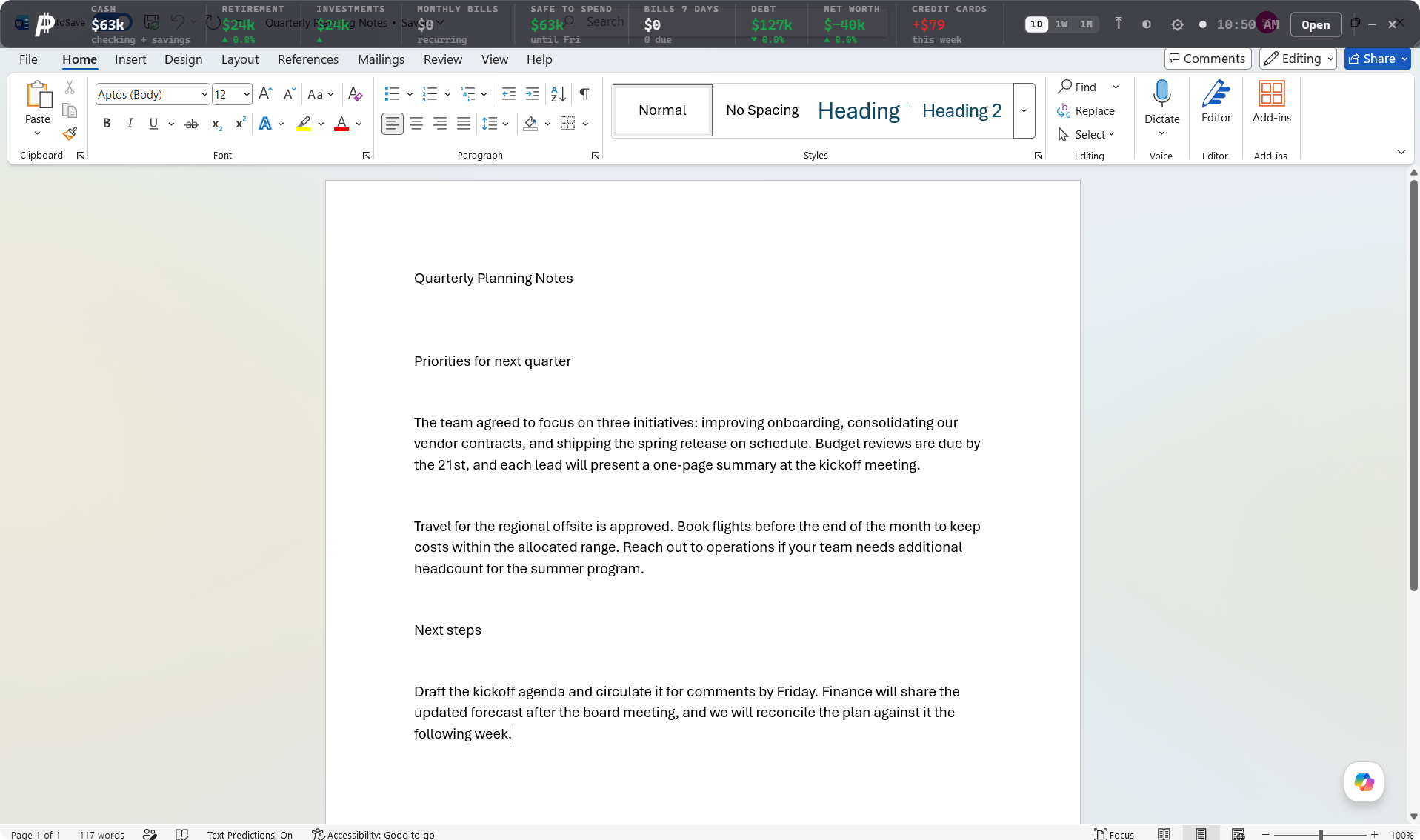
The Persistence desktop HUD floating above a document
Always on top
A slim bar pinned above everything — email, spreadsheets, your IDE, a game. It's just there, all day, without stealing a single pixel of your workflow.
Live tiles & deltas
Net Worth, Safe to Spend, Credit Cards this week, Bills in 7 days, Goal pacing — each tile shows the number and its green/red change, with a 1D / 1W / 1M toggle.
Global hotkeys
Ctrl+Shift+H shows or hides the HUD instantly. Ctrl+Shift+P flips it into ghost mode. They work from any app, anytime — no need to click the bar first.
Ghost (click-through) mode
Make the bar see-through to your mouse — clicks pass straight through to whatever's behind it. The HUD stays visible but is completely out of the way.
Reshape to fit
Drag any edge and the layout fluidly reflows — from a full-width top bar to a compact corner widget. It fills whatever size and shape you give it.
Drag to reorder
Grab any tile and drop it where you want. Put the numbers you care about first — your order is remembered between launches.
Move it or snap it
Drag the HUD anywhere on screen by its grip, or hit snap-to-top to lock it flush against the top edge of your display in one click.
Settings panel
Tune bar opacity, choose exactly which metrics show, set the refresh interval, switch light/dark, toggle launch-at-startup, or sign out — all inline, without leaving the bar.
Starts & updates itself
Opens automatically when your computer boots, refreshes your accounts on a schedule, and updates itself in the background with cryptographically signed releases.
Tuck it away
Minimize the HUD to the system tray when you want a clean screen, and bring it back from the tray menu or a hotkey the moment you need a glance.
The Web App

The full picture, when you want to dig in.

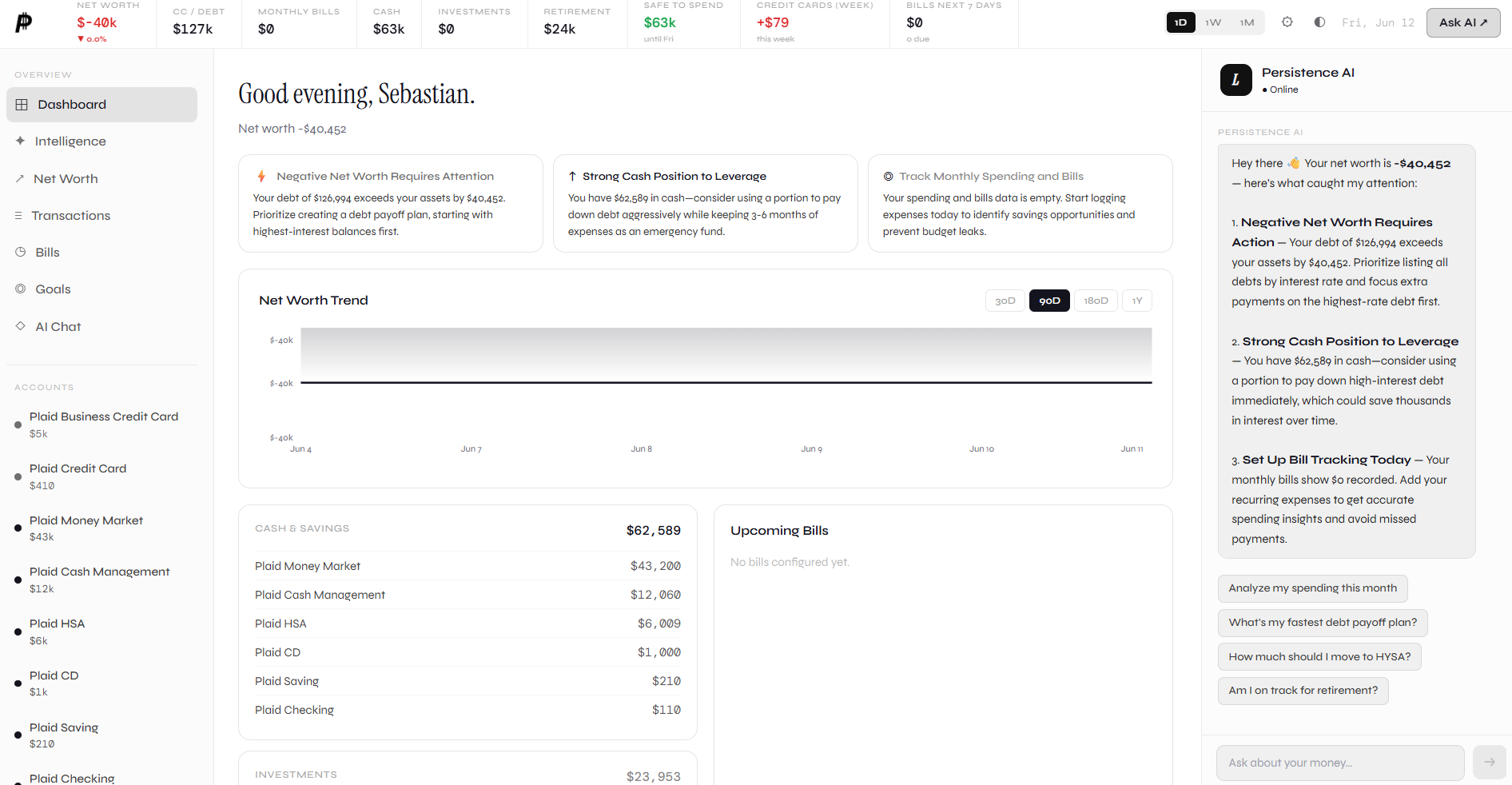
When a glance isn't enough, the full dashboard is one click away in your browser — same data, room to explore. Net worth over time, every account, AI-written insights, and a chat that already knows your money.

The Persistence web dashboard showing net worth, accounts, insights and the built-in AI chat
📈
Net worth, charted
Your net worth trended over time, with the same metric bar from the HUD up top — every figure carrying a 1D / 1W / 1M delta so you see direction at a glance.
AI insights, not just numbers
The dashboard surfaces plain-English observations — "strong cash position to leverage," "negative net worth needs attention" — the moment they actually matter.
Persistence AI, built in
A chat panel sits right beside your data with full context. Ask about your spending, a bill, or whether you can afford something — and get an answer grounded in your real accounts.
🧠
Money Intelligence
Automatic subscription detection, a 30-day cash-flow forecast that warns before you dip below zero, smart alerts, and one-click cleanup of messy transaction labels.
Every account in one place
Checking, savings, credit cards, loans and investments across every bank — linked securely through Plaid and refreshed automatically.
Bills & goals
See what's due in the days ahead before it hits, and track real progress toward the things you're saving for — all on the same screen.
Why Persistence

No other money app
does this.

Every finance app is a tab you forget to open. Persistence is the only one that's simply — there.

The Only Persistent HUD
Budgeting apps live in a browser tab you visit once a month. Persistence lives on your screen: an always-on-top bar over every window, with global hotkeys and a click-through ghost mode. Constant awareness, zero effort.
Bring Any AI You Want
Our MCP server plugs your finances into Claude Desktop, Claude Code, Cursor — any MCP-compatible client you already use. Ask your own AI about your actual money. Read-only, revocable, yours.
Keep Your Current Apps
Already on Monarch, Rocket Money, or YNAB? Keep them. Persistence connects to the same banks and works alongside whatever you use — zero migration, no switching cost. It's the always-visible layer they're missing.
🔒
Security You Can Actually Read
Your bank login never touches us (Plaid handles it), tokens are double-encrypted at rest, sessions are short-lived, and app updates are cryptographically signed. Read exactly how your data is protected →
MCP Built In

Your money, in every AI you use.

Persistence ships a hosted MCP server. Connect the assistants you already work with — read-only, with a key you can revoke anytime.

Claude Claude Code Cursor ChatGPT Windsurf Zed VS Code + anything that speaks MCP
PERSISTENCE CONNECTED · 5 TOOLS AVAILABLE
Can I afford the $400 flight to Denver this month?
persistence · get_financial_summary
Yes — comfortably. You have $1,240 safe to spend before Friday and $18,920 in cash. Booking the $400 flight still leaves every bill this month covered, with about $840 of cushion. Want me to log it as a planned expense?
Connect to Claude
Two minutes: create a key, paste the config, ask your first question.
Phone & Watch

The same glance, on every screen you own.

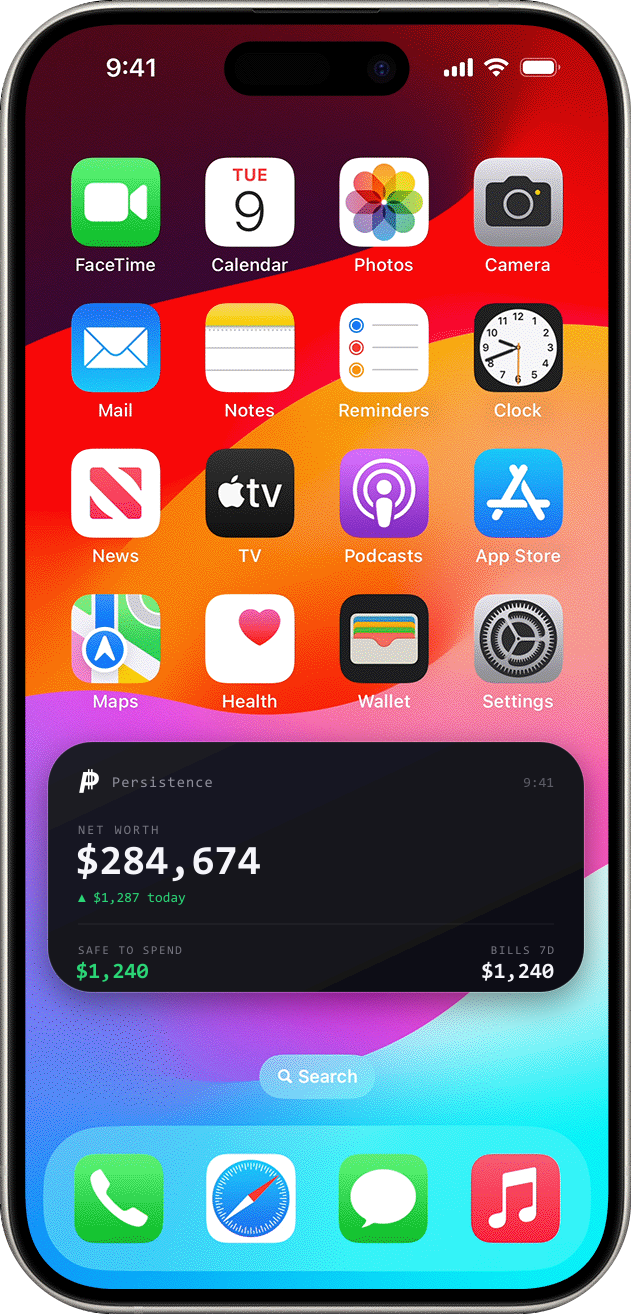
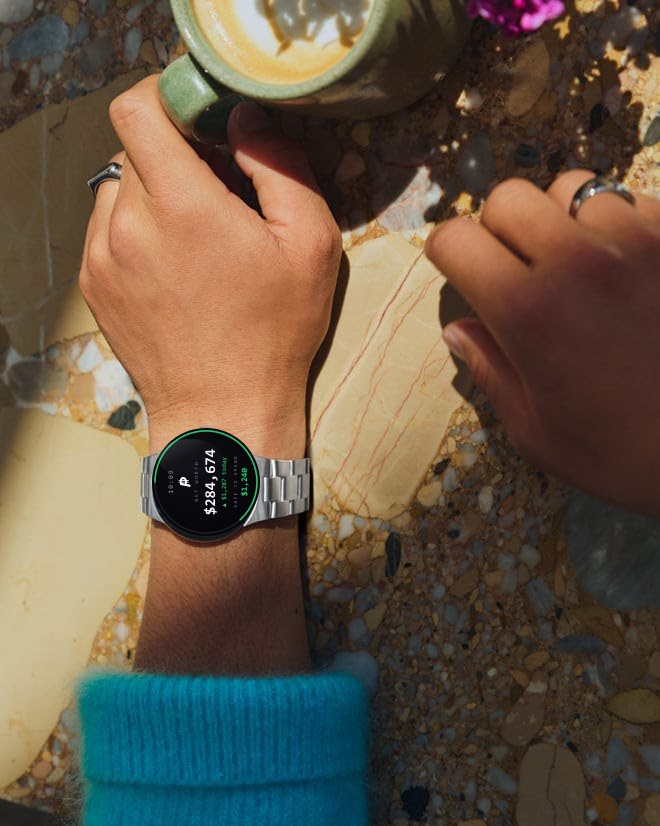
Persistence follows you off the desktop. A home-screen widget on your phone and a watch face keep your net worth and safe-to-spend a glance away — no app to open, nothing to tap. Design preview, shipping with the mobile apps.

The Persistence widget on an iPhone home screen showing net worth and safe-to-spend
On your phone.
A home- and lock-screen widget shows net worth and what's safe to spend, refreshed in the background — your money, before you even open an app.
The Persistence widget on a Google Pixel Watch showing net worth and safe-to-spend
On your wrist.
A Pixel Watch face puts your net worth and safe-to-spend one wrist-flick away — a quick gut-check before you tap to pay or walk into a store.
iPhone & Pixel Watch widgets · design preview
Built Different

Everything your finances
need. Nothing they don't.

Persistence is the financial command center you've been missing — always visible, always accurate, always one question away from an answer.

Persistent Desktop HUD
A 52px overlay that lives at the top of every screen. Net worth, debt, cash flow — always in view, never in the way. macOS, Windows, Linux.
AI Financial Advisor
Claude-powered chat that knows your actual balances, transactions, and goals. Ask anything. Get real answers with real numbers — not generic advice.
🔗
MCP Server
Connect your finances to Claude Desktop, Claude Code, Cursor — any MCP-compatible AI client. Your money becomes a tool your AI can use, safely and read-only.
Smart Automation
Set rules, let AI execute them. "Move $500 to savings when checking hits $8k." "Alert me if a bill doubles." Propose, confirm, done.
📱
Every Device
iOS home screen and lock screen widgets. Android Glance widgets. Apple Watch complications. Your net worth is always one glance away.
🏦
Plaid Integration
Connect 12,000+ financial institutions. Checking, savings, credit cards, loans, 401k, IRA, brokerage — everything in one view.
Simple Setup

Three steps to
financial clarity.

01 — Create account
Sign up in 60 seconds
Email and password — that's it. No credit card. No endless onboarding. Your dashboard is ready immediately.
02 — Connect your bank
Link accounts via Plaid
Securely connect checking, savings, credit cards, and investment accounts. Persistence syncs everything automatically.
03 — Install the HUD
Download the desktop app
Install the Tauri app, add the iOS widget, connect to Claude Desktop via MCP. Your financial command center is live.
Straightforward Pricing

Start free. Scale when
you need it.

Free
$0 / month
Perfect for getting started
  • Dashboard + net worth chart
  • Up to 2 Plaid accounts
  • AI chat (10 messages/day)
  • iOS home screen widget
  • Basic bill tracking
Wealth
$29 / month
For serious investors
  • Everything in Pro
  • Portfolio performance analysis
  • Tax-loss harvesting signals
  • AI investment research (beta)
  • Multi-user / household
  • Priority support
  • API access
Early Users

What people are saying.

"I glance at my net worth more than I check Slack. Persistence made me actually care about my money."
Sarah K.
Software engineer, Bay Area
"Asked the AI 'am I saving enough for retirement?' and it gave me a specific, correct answer in 5 seconds. Insane."
Marcus T.
Product manager, Austin
"The MCP integration means Claude Desktop can now answer questions about my actual portfolio. This is the future."
Priya N.
Data scientist, NYC
Your command center awaits

Stop forgetting what
your money is doing.

Free to start. No credit card. 60-second setup. Your net worth on every screen in minutes.